Kronoset Padel Scoreboard: Complete Guide & Alternative

Everything you need to know about Kronoset, plus an app-based alternative

What is Kronoset?

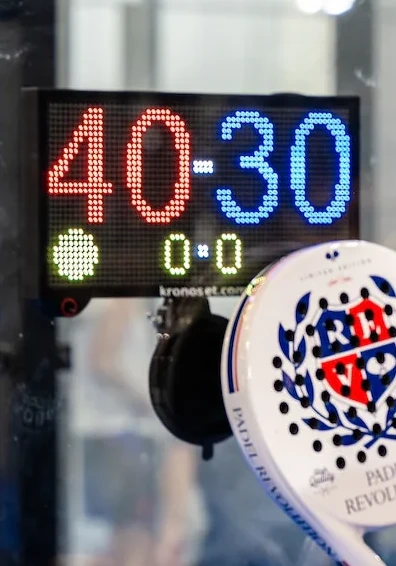
Kronoset is a contactless digital scoreboard designed specifically for padel courts. It's a dedicated hardware device that uses sensors to detect your racket, allowing you to update the score without pressing any buttons.

How Kronoset Works:

  • Contactless Scoring: Hold your racket near the sensor for 1 second to add a point, 3 seconds to subtract a point, or 10 seconds to reset
  • LED Display: Shows the current score visible from anywhere on the court
  • Dual Sensors: Separate sensors for red team and blue team
  • Battery Powered: Runs on a 10,000 mAh USB-C power bank (not included)
  • Easy Mounting: Suction cup attaches to glass walls in under one minute

Kronoset Pricing:

€189 (reduced from €249)

Shipping: Free in Spain, €40 international

Total cost: ~€229 (~$250 USD) internationally, plus power bank

Quick Facts

  • Type: Hardware device
  • Sport: Padel only
  • Control: Racket sensor
  • Display: LED
  • Battery Life: 20+ matches
  • Mounting: Suction cup (glass only)
  • Voice announcements: No

Kronoset Pros & Cons

Pros

  • Contactless control - no buttons or remotes to carry
  • Dedicated device - does one thing well
  • Good battery life - 20+ matches per charge
  • Quick setup - mounts in under a minute
  • LED display visible from anywhere
  • Portable - no cables required

Cons

  • Must walk to the wall to update score between every point
  • Mounted on one side only - hard to see from the other side of court
  • High price - €189 plus shipping
  • Bulky device to carry to the court
  • No voice announcements
  • Need to buy separate power bank

Looking for a Kronoset Alternative?

ScoreBot: The App-Based Alternative

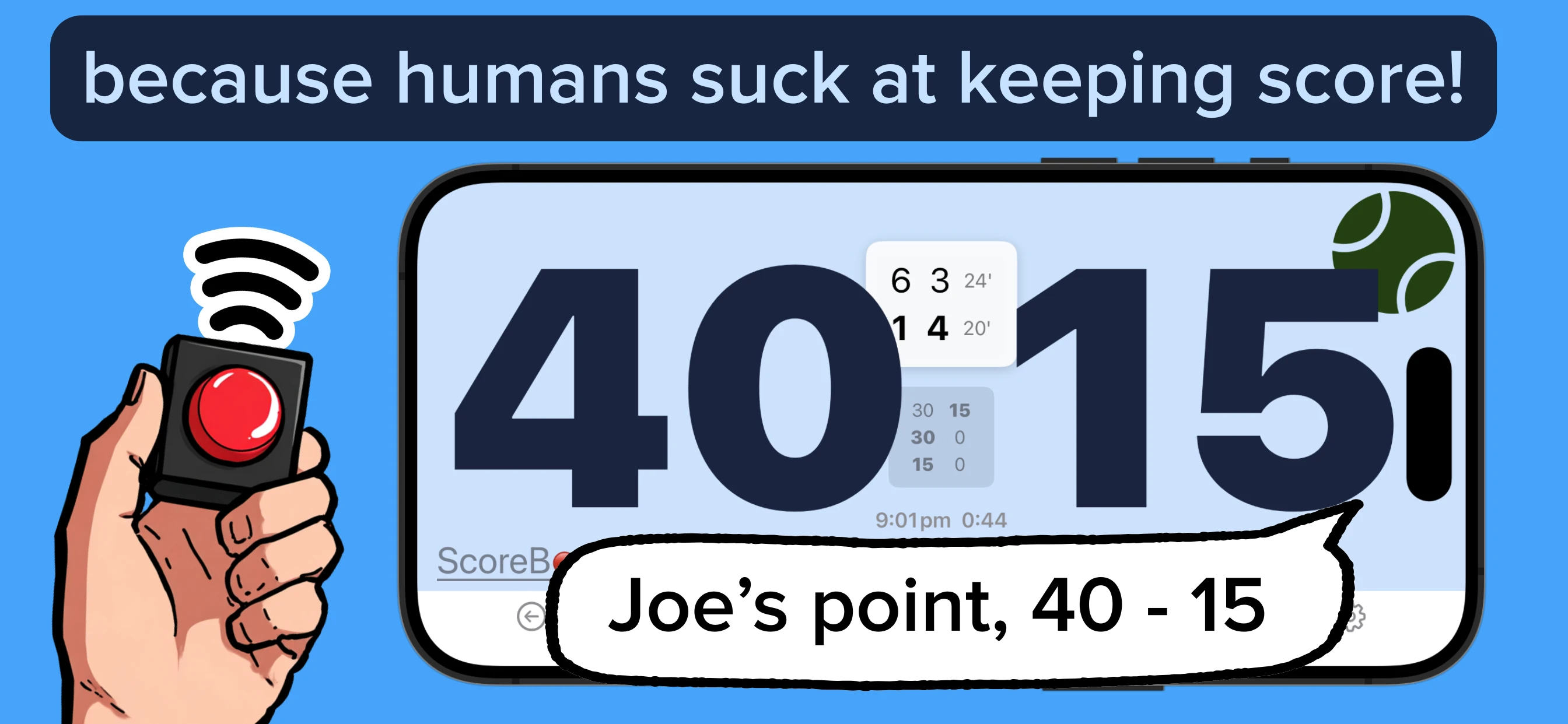
Turn your phone into a professional scoreboard with voice announcements and remote control from anywhere on court.

No Walking to Update Score

Remote on your person - just click

Visible from Both Sides

Mount in the middle of the court

Voice Announcements

Like a real referee

Ultra Portable

Just your phone + pocket remote

ScoreBot App Screenshot

How ScoreBot Works:

  1. Mount your phone in the middle of the court using a flexible phone mount (~$10-15) - visible from both sides
  2. Clip a pocket-sized Bluetooth remote to your clothing (~$5-15) - always on you
  3. Optional: Connect a Bluetooth speaker for voice announcements (~$20-40)
  4. Score with a quick click: 1 click = your point, 2 clicks = opponent's point, 3 clicks = undo

Key Differences from Kronoset:

  • No walking required - remote is already on your person, just click between points
  • Better visibility - mount in the middle of the court, not stuck on one side
  • Ultra portable - just your phone (which you already carry), a pocket remote, and a small speaker

Kronoset vs ScoreBot: Side-by-Side Comparison

Kronoset Device

Kronoset

ScoreBot on Court

ScoreBot

Feature Kronoset ScoreBot
Price €189 + €40 shipping
(~$250 total)
~$10-30
(remote + mount)
Sports Supported Padel only Tennis & Padel
Voice Announcements
Control Method Racket near wall sensor Bluetooth remote (anywhere)
Need to Walk to Device? Yes - must be at wall No - control from anywhere
What You Need Kronoset device + power bank Your phone + remote + mount
Mounting Requirements Glass wall (suction cup) Any fence or wall
Visibility from Both Sides No - one side only
(hard to see from far side)
Yes - center mount
(visible to all players)
Portability Bulky device to carry
(+ power bank)
Ultra portable
(phone you already carry)
Setup Time <1 minute ~2 minutes

Which Should You Choose?

Choose Kronoset if you:

  • Want a dedicated device that does one thing
  • Prefer contactless racket sensor control
  • Don't mind walking to the wall between points
  • Don't mind the €189+ price point
  • Don't need voice announcements
  • Play on one side of the court only

Choose ScoreBot if you:

  • Don't want to walk to the wall between every point
  • Want the score visible from both sides of the court
  • Want voice announcements like a referee
  • Prefer ultra-portable setup (phone you already carry)

Frequently Asked Questions About Kronoset

Kronoset costs €189 (reduced from €249). Shipping is free within Spain but costs €40 for international orders. You'll also need a 10,000 mAh USB-C power bank if you don't already have one. Total cost is approximately €229 (~$250 USD) internationally.

No, Kronoset is designed specifically for padel and only supports padel scoring. ScoreBot works for both if needed.

No, Kronoset is a visual LED display only and does not offer voice announcements. If you want referee-style score announcements, ScoreBot offers this feature when paired with a Bluetooth speaker.

Yes, ScoreBot is an app-based alternative. ScoreBot uses your existing phone as the display, includes voice announcements, and lets you control the score from anywhere on court with a pocket-sized remote clipped to your clothing - no walking to the wall required. Setup cost is ~$10-30 for a remote and mount, compared to Kronoset's €189+ for the device.

No, Kronoset mounts on one side of the court using a suction cup on the glass wall. This means it can be difficult to see from the opposite side, especially from a distance. ScoreBot can be mounted in the middle of the court on any fence or wall, making it easily visible to all four players from both sides.

Yes, with Kronoset you need to walk to the wall where the device is mounted and hold your racket near the sensor to update the score. This means walking to the device between every point. With ScoreBot, the Bluetooth remote is clipped to your clothing, so you just click it without moving - the remote is always on you.

Kronoset runs on an external 10,000 mAh USB-C power bank (not included) and can support more than 20 matches on a single charge. You'll need to remember to charge the power bank between sessions.

Try ScoreBot

No walking to the wall. Voice announcements. Remote control from anywhere on court.

View Recommended Accessories →

Questions about Kronoset or ScoreBot? Email graeme@scorebot.app